

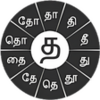
Script-aware Tamil keyboard with clustered character wheels for efficient native typing and rich symbol support
Script-aware Tamil keyboard with clustered character wheels for efficient native typing and rich symbol support
Vote (1 votes)
Program license Free
Developer Swarachakra Team IDC IIT Bombay
Version 2.01
Works under Android
Vote
(1 votes)
Developer
Swarachakra Team IDC IIT Bombay
Works under
Android
Program license
Free
Version
2.01
Pros
- Free Tamil keyboard designed around the traditional script structure
- Clustered character wheel makes a large alphabet manageable on small screens
- Covers Tamil-specific numbers, punctuation, special characters, and technical symbols
- Customizable layout and interface for a more tailored typing experience
- Small file size and good compatibility with most mobile devices
- Part of a broader Swarachakra platform for Indic scripts
Cons
- Standardized approach does not capture all regional or loanword nuances
- Voice typing is weak and not reliable for regular use
- Switching among multiple languages like Tamil, Hindi, and English can feel cumbersome
- Spell check behavior can appear inconsistent
- English layout would benefit from more conveniences such as automatic capitalization
Swarachakra Tamil Keyboard is a free Android keyboard that lets you write in Tamil script using a layout built around the traditional structure of the language. It groups letters by their linguistic categories and reveals related characters on a wheel when you press and hold a key, which helps fit the large Tamil alphabet into a phone-size keyboard.
This app suits Tamil speakers who prefer to type in native script on their mobile devices, especially those comfortable with the standard arrangement of Tamil consonants and vowels and who mainly rely on manual typing rather than voice input.
Layout built around real Tamil script
The core appeal of Swarachakra Tamil Keyboard lies in how closely it follows the Tamil writing system. Instead of copying a typical QWERTY layout, it displays consonants according to their place in the traditional Tamil chart, and related characters are clustered together.
With the Tamil alphabet having around 247 letters, this clustered design helps manage the limited space on mobile screens. Each key represents a base character, and holding it brings up a wheel of its variations. You then tap the exact letter you want. For users who already know the script, this arrangement can feel natural and logically organized.
Typing experience and customization
Typing in Tamil with Swarachakra revolves around that press-and-hold gesture to bring up the character wheel. Once you get used to where the base consonants and their related forms sit, the workflow can be quite fluid for everyday messaging and writing.
The keyboard also offers customization, so you can adapt aspects of the layout and interface to your preferences. This helps frequent typists tune the experience to how they usually type.
Beyond letters, Swarachakra Tamil Keyboard supports numbers and symbols that are specific to Tamil script, including punctuation marks, special characters, and technical notations. This allows you to stay in the same keyboard while writing more formal or specialized text, without switching layouts just to insert symbols.
Coverage, standardization, and language scope
The keyboard is built on the broader Swarachakra platform, a free text input system made to bring Indic scripts to modern devices. Within that family there are other language versions, such as Swarachakra Asomiya and Swarachakra Marathi, although this particular app focuses on Tamil.
Internally, the Tamil layout follows a standardized form of the language. That keeps the structure consistent, but some nuances based on loanwords or regional dialects are not represented. For most general writing this will not be a problem, yet very region-specific expressions may not map as smoothly to the available character combinations.
On the positive side, the app is described as having good support across most mobile devices, and it has a relatively small file size. It does not demand much storage, which is helpful if you are using a phone with limited free space.
Multilingual use and English typing
For users who type in more than one language, Swarachakra Tamil Keyboard can feel less flexible. Switching between Tamil and another language is possible, but moving quickly among Tamil, Hindi, and English can feel cumbersome. The process of toggling is described as restrictive, which may frustrate people who constantly move between multiple scripts in a single conversation.
Within the English layout, some users would like automatic capitalization at the beginning of each sentence. That sort of quality-of-life refinement would make the English side of the keyboard feel more in line with typical Android keyboards.
There is also a spell check function, but it does not always behave consistently. Sometimes it appears to work, sometimes it does not, and it is not entirely clear whether this is a usability issue or a technical one. Either way, anyone who depends heavily on spell checking may find the experience uneven.
Voice typing and limitations
Voice input is one of the weaker aspects of Swarachakra Tamil Keyboard. While the touch interface and on-screen layout are praised for being intuitive, the speech-to-text side still needs significant improvement. Converting spoken Tamil into accurate written text is not something this app has fully mastered yet.
For that reason, users who rely heavily on voice typing will likely not find what they are looking for here. The app is at its best when you are using the on-screen keys and character wheels to compose text manually.
Overall impression
Swarachakra Tamil Keyboard delivers a focused, script-aware typing experience that serves Tamil speakers who want to write in their own script on Android devices. The thoughtful organization of characters, the clustered wheel layout, and the presence of Tamil-specific symbols contribute to a keyboard that can feel both compact and expressive once you become familiar with it.
At the same time, multilingual users, people who depend on polished spell check, or those who prioritize voice typing may run into its limits. Despite these shortcomings, it remains a strong option for Tamil script input, especially for native speakers who value a layout that respects the traditional structure of their language.
Pros
- Free Tamil keyboard designed around the traditional script structure
- Clustered character wheel makes a large alphabet manageable on small screens
- Covers Tamil-specific numbers, punctuation, special characters, and technical symbols
- Customizable layout and interface for a more tailored typing experience
- Small file size and good compatibility with most mobile devices
- Part of a broader Swarachakra platform for Indic scripts
Cons
- Standardized approach does not capture all regional or loanword nuances
- Voice typing is weak and not reliable for regular use
- Switching among multiple languages like Tamil, Hindi, and English can feel cumbersome
- Spell check behavior can appear inconsistent
- English layout would benefit from more conveniences such as automatic capitalization


